












 4.5 on




Digital license key delivered via email, including a step-by-step guide & download link.



Digital license key delivered via email, including a step-by-step guide & download link.
Fast and reliable! Bought a Microsoft Office 2021, and the process was smooth and quick.
Paul Dean, 🇬🇧
Their service is straightforward, and they deliver what they promise. No frills, just good products and responsive support when needed.
Gail Schloss, 🇨🇦
Super expérience avec Licengo ! Achat de logiciel Microsoft et clé de licence reçue instantanément. Service et support excellents. Je recommande vivement !
Henry tKint, 🇧🇪
Licengo delivers excellent digital products with prompt service and professional communication. Highly reliable partner!
Darrell Carnell, 🇨🇦
I recently purchased Office 2021 Pro Plus from Licengo, and the experience was flawless! The process was quick and simple, and I received my product key within minutes only. Installation was smooth, and the software works perfectly. Great value for money and excellent customer service. Highly recommend!
Sandra, 🇬🇧
This is the LTSC (Long-Term Servicing Channel) version of Professional Plus 2024. It’s the only version currently available on the market for office 2024 lifetime license. The main difference is that the LTSC version only receives security updates, while the regular (Retail) version receives security and feature updates.
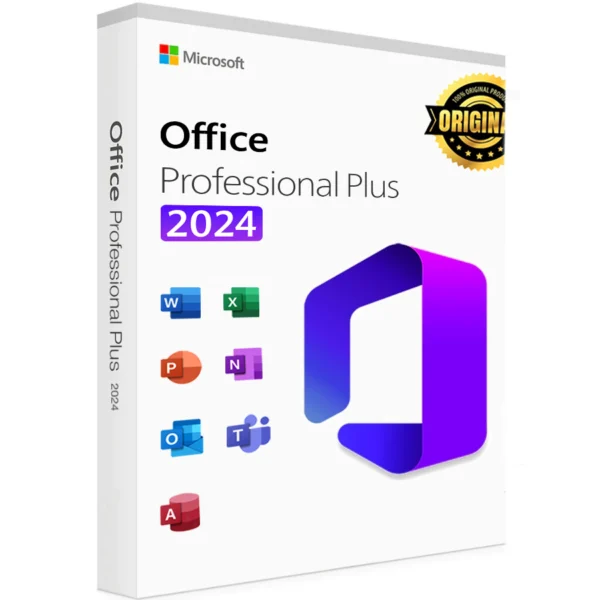
Microsoft Office 2024 Professional Plus is the premier solution for professionals and enterprises aiming to maximize efficiency and streamline operations. Packed with cutting-edge tools for advanced data analysis, document management, and seamless communication, this edition empowers users to tackle the most complex tasks and manage large-scale projects with ease.
Key Features and Benefits
1. Comprehensive Application Suite
- Advanced Word Processing: Leverage the professional-grade editing, reviewing, and sharing features in Microsoft Word for impeccable document creation.
- Sophisticated Data Handling: Microsoft Excel offers enhanced data analysis and visualization tools, including advanced formulas and array dynamics for complex tasks.
- Dynamic Presentations: Create captivating presentations with PowerPoint’s new multimedia, animation, and layout features.
- Extensive Email and Calendar Management: Manage your inbox and schedule seamlessly with Microsoft Outlook’s enhanced organizational tools.
- Database Management: Quickly track, organize, and report data with Microsoft Access’s powerful database capabilities.
2. Enhanced Collaboration and Communication
- Microsoft Teams Integration: Boost teamwork and communication with built-in Teams integration, ensuring smooth collaboration across your organization.
- Real-Time Co-Authoring: Work on documents simultaneously with team members worldwide, enhancing productivity and reducing turnaround times.
3. Installation and Licensing
- One-Time Purchase: Enjoy lifetime access to Microsoft Office 2024 Professional Plus with a single purchase, including ongoing updates and security enhancements.
- Volume Licensing Options: Perfect for businesses, offering flexible deployment across multiple devices and users.
4. Customer Support and Assistance
- Dedicated Support Resources: Access a vast library of help articles, tutorials, community forums, and direct customer service for uninterrupted productivity.
- Regular Updates: Stay ahead with updates that bring new features, enhance performance, and ensure security compliance.
Why Choose Microsoft Office 2024 Professional Plus?
With its robust functionality, advanced tools, and seamless integration, Microsoft Office 2024 Professional Plus is the go-to solution for professionals and organizations striving for peak productivity. Upgrade your toolkit today and revolutionize the way you work!
Optimize your business operations and experience unparalleled efficiency with Microsoft Office 2024 Professional Plus.
| Brand |
Microsoft |
|---|---|
| Activation |
Online |
| Devices |
1 PC |
| Label |
Limited-Time Offer |
| Processor |
1.1 Ghz, 2 core |
| Memory |
4 GB RAM |
| Hard Disk |
4.0 GB of available disk space |
| Display |
(1280 x 768) Screen Resolution |
Frequently Asked Questions
What are the system requirements for Office 2024 Pro Plus?
Office 2024 Pro Plus requires Windows 10 or later (64-bit), at least 4GB of RAM, 10GB of free storage space, and an internet connection for installation and updates.
Can I use Office 2024 Pro Plus on multiple devices?
Yes, Office 2024 Pro Plus supports multiple device installations based on your Microsoft 365 subscription. Check your licensing terms for exact limits.
How is Office 2024 Pro Plus different from previous versions?
Office 2024 Pro Plus offers enhanced AI-powered tools, improved collaboration features, cloud integration, and updated user interfaces for better productivity.
Is Office 2024 Pro Plus compatible with Mac?
No, Office 2024 Pro Plus is designed specifically for Windows. Mac users can access Office through the Microsoft 365 subscription plan or Office 2024 Home & Business tailored for macOS.
How do I activate Office 2024 Pro Plus after installation?
Activation requires a valid product key or a Microsoft 365 subscription associated with your account. Follow the prompts during installation or use the activation wizard within the app
Where can I buy Office 2024 Pro Plus?
Office 2024 Pro Plus can be purchased directly from the Microsoft Store, authorized resellers, or through your organization’s licensing program.
Does Office 2024 Pro Plus include cloud storage?
Office 2024 Professional Plus does not include cloud storage services like OneDrive. For integrated cloud storage and additional features, consider subscribing to Microsoft 365, which offers 1 TB of OneDrive storage per user.
How do updates work for Office 2024 Pro Plus?
Updates are automatically downloaded and installed via Microsoft Update, ensuring you always have the latest features and security enhancements.
Can I upgrade to Office 2024 Pro Plus from an older version?
Yes, you can upgrade from older versions of Office, but it’s recommended to uninstall previous versions first to avoid conflicts
Download the program with the following download link
| LANGUAGE | 64 BITS | 32 BITS |
| DEUTSCH | Herunterladen | Herunterladen |
| ENGLISH | Download | Download |
| FRANÇAIS | Télécharger | Télécharger |
| ITALIANO | Scarica | Scarica |
| ESPAÑOL | Descargar | Descargar |
| PORTUGUES | Descarga | Descarga |
PLEASE NOTE: To ensure a successful installation of the lifetime version of Office, we recommend that you uninstall any previously installed versions of Office on your computer, including Office 365, as it may cause conflicts during installation.
1- Installation process:
Once the download is complete, follow these steps:
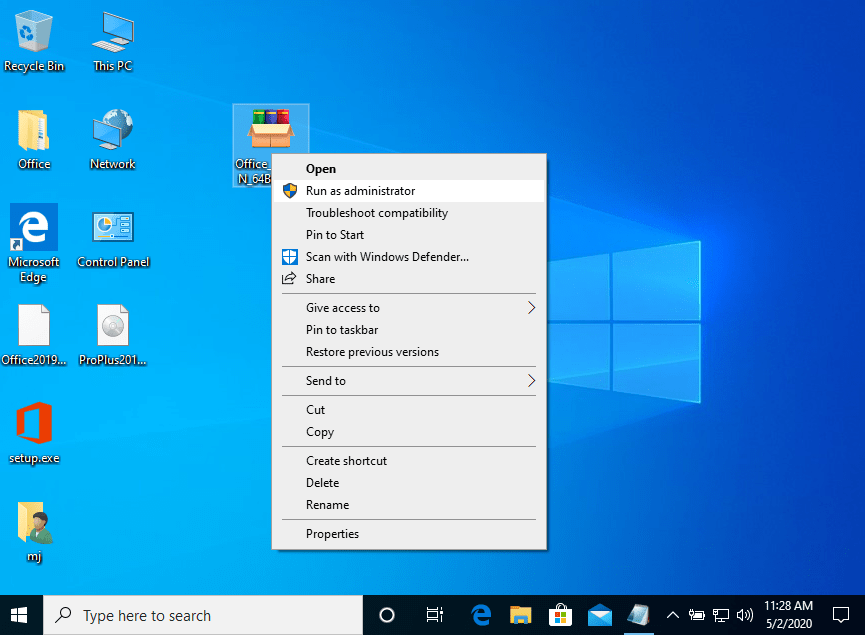
- Right Click on the file and then select the option, “Run as administrator”
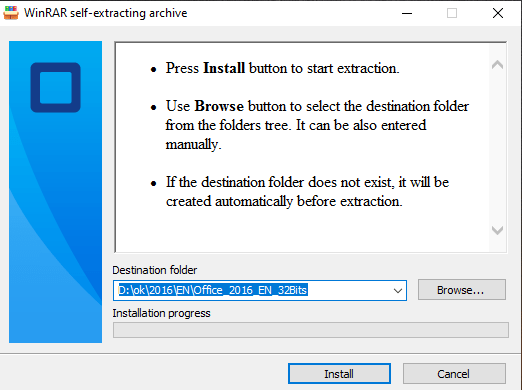
2. Click on the “Install” button. This action unzips the application and will install your product.
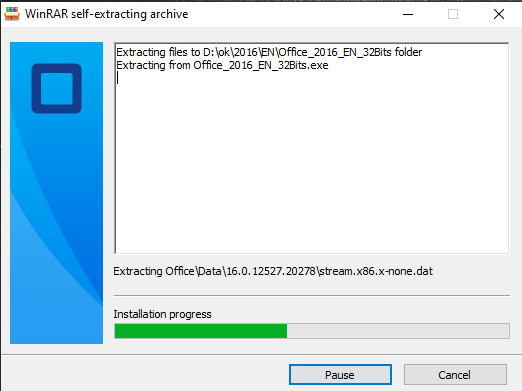
2.1- Software activation (Option 1):
Once the download is complete and the installation of the program is complete, enter the activation key when running any application from the Microsoft Office package, it will be the first thing that will ask you.
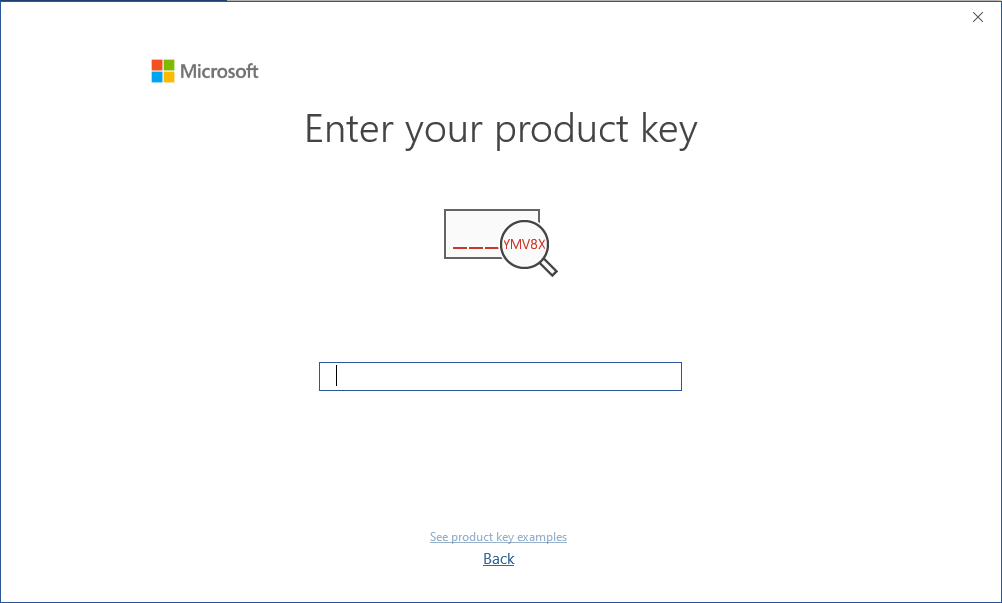
During the installation of Microsoft Office, you should have been prompted to enter the product key we sent you. If this did not happen, please open Word, click on “File,” then “Account,” and enter the provided key there.
If you don’t do this, your purchased Microsoft Office will turn into a trial version after 30 days.
2.2- Software activation (Option 2):
Activation by Phone Offline
The process of activating Office via telephone is simple, involving a few steps:
Step 1: Open any Microsoft Office application on your system and click on the “Account” tab in the left sidebar.
Step 2: In the account window, locate the “Activate Product” ou “Change product” button at the center of the screen and click on it.
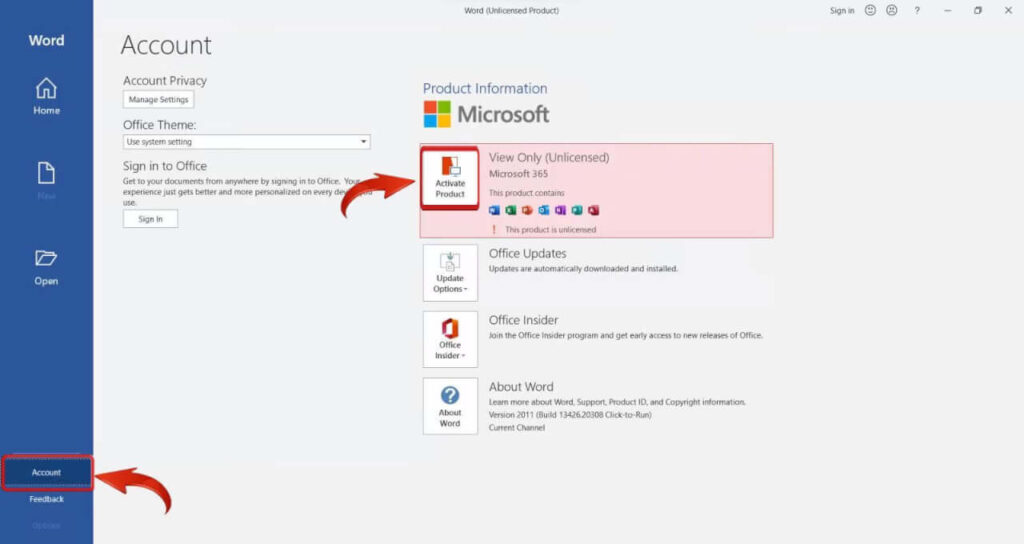
Microsoft Office 2016 Activate Product
Step 3: Click on the “I don’t want to sign in or create an account” link at the bottom of the dialog box.
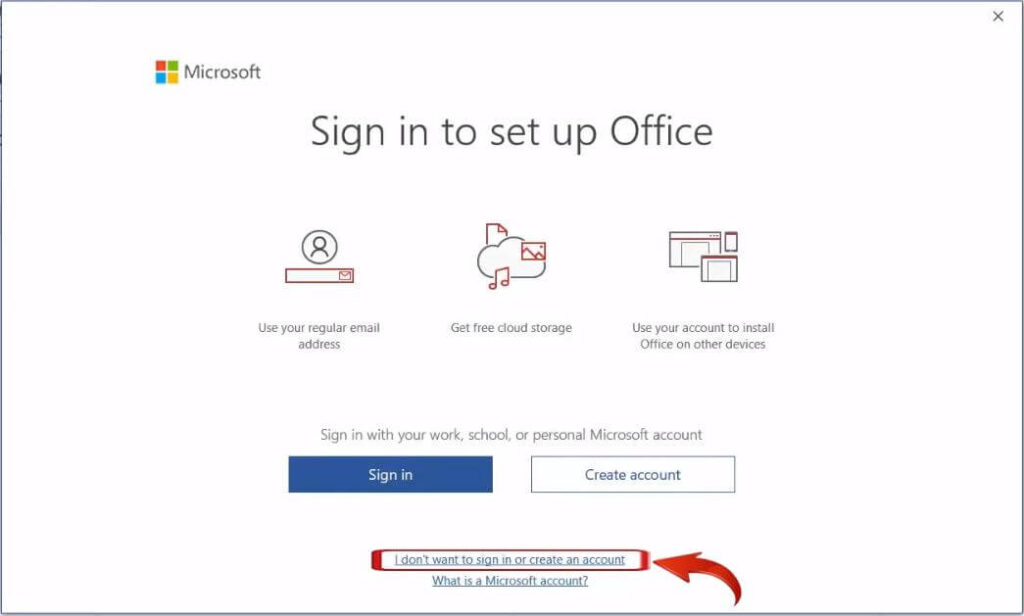
Microsoft set up Office dialog
Step 4: Insert your product key in the field at the center of the screen.
Step 5: Upon entering, the “Activate” button will appear; click on it.
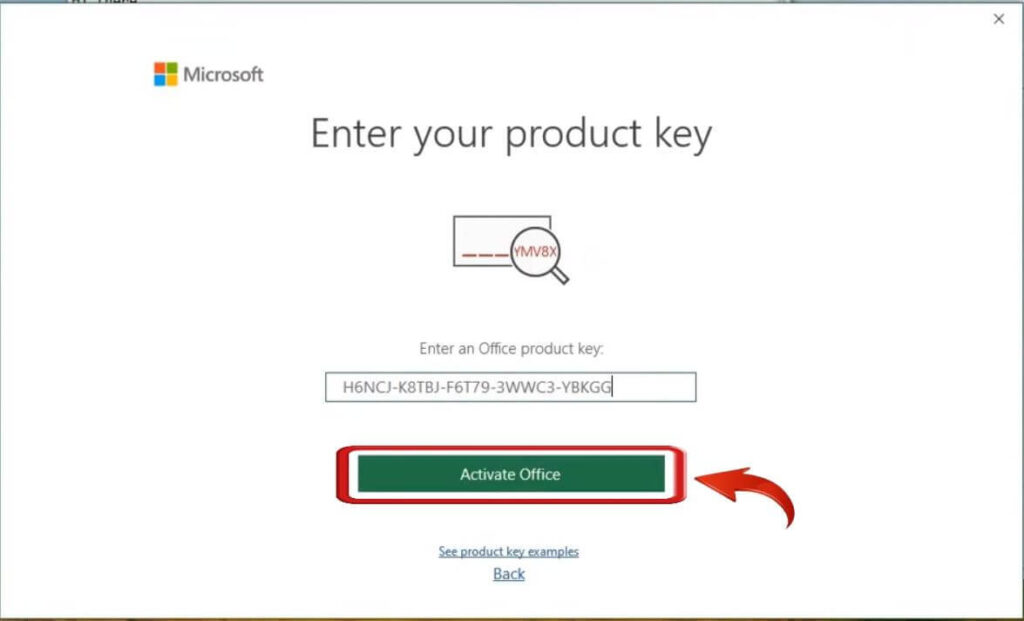
Microsoft Office Activate Office
Step 6: The Microsoft Office Activation wizard will pop up; select “I want to activate the software by telephone” and click on “Next”.
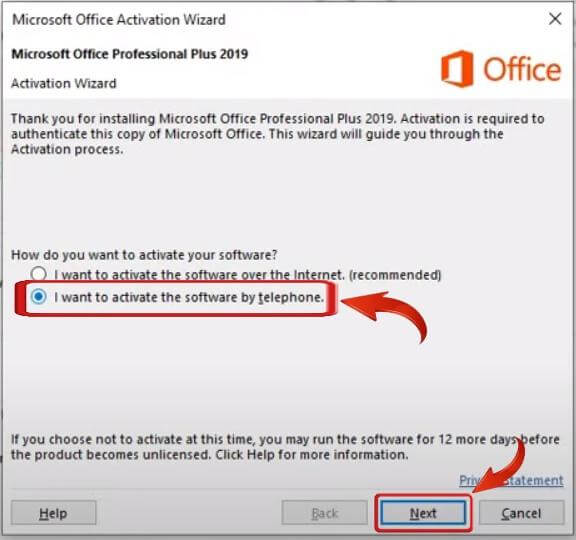
Microsoft Office activate by telephone
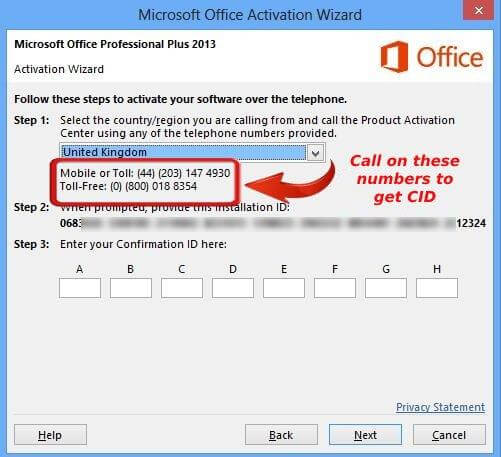
Step 7: In the next window, choose your region in “Step 1” and find your Installation ID (IID). Copy the IID as you’ll need it in the next step.
Microsoft Office select region
Step 8: Use the toll-free number provided beneath your region, provide your IID when asked, and you’ll receive a Confirmation ID.
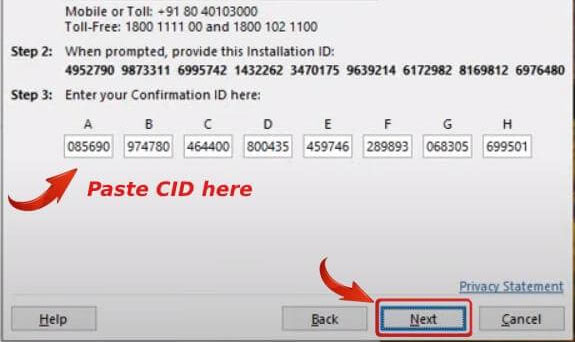
Step 10: After entering your Confirmations ID, click on “Next”, and your Microsoft Office copy will be activated. Click on Close and restart Microsoft Office.
Laden Sie das Programm über den folgenden Download-Link herunter
| SPRACHE | 64 BITS | 32 BITS |
| DEUTSCH | Herunterladen | Herunterladen |
| ENGLISCH | Herunterladen | Herunterladen |
| FRANÇAIS | Télécharger | Télécharger |
| ITALIANO | Scarica | Scarica |
| ESPAÑOL | Descargar | Descargar |
| PORTUGUES | Descarga | Descarga |
BITTE BEACHTEN SIE: Um eine erfolgreiche Installation der Lifetime-Version von Office zu gewährleisten, empfehlen wir Ihnen, alle zuvor installierten Versionen von Office auf Ihrem Computer zu deinstallieren, einschließlich Office 365, da dies zu Konflikten während der Installation führen kann.
1- Installationsvorgang:
Sobald der Download abgeschlossen ist, folgen Sie diesen Schritten:
- Klicken Sie mit der rechten Maustaste auf die Datei und wählen Sie dann die Option “Als Administrator ausführen”.
2. Klicken Sie auf die Schaltfläche “Installieren”. Dadurch wird die Anwendung entpackt und Ihr Produkt installiert.
2- Software-Aktivierung:
Sobald der Download und die Installation des Programms abgeschlossen sind, geben Sie den Aktivierungsschlüssel ein, wenn Sie eine beliebige Anwendung aus dem Microsoft Office-Paket starten. Es wird das erste sein, was Sie dazu auffordert.
Während der Installation von Microsoft Office sollten Sie aufgefordert worden sein, den Produktschlüssel einzugeben, den wir Ihnen geschickt haben. Falls dies nicht geschehen ist, öffnen Sie bitte Word, klicken Sie auf “Datei”, dann auf “Konto” und geben Sie dort den mitgelieferten Schlüssel ein.
Wenn Sie dies nicht tun, wird Ihr erworbenes Microsoft Office nach 30 Tagen zu einer Testversion.
Téléchargez le programme à l’aide du lien suivant
| LANGUE | 64 BITS | 32 BITS |
| DEUTSCH | Recherche d’informations | Recherche d’informations |
| ANGLAIS | Télécharger | Télécharger |
| FRANÇAIS | Télécharger | Télécharger |
| ITALIANO | Scarica | Scarica |
| ESPAÑOL | Descargar | Descargar |
| PORTUGUES | Descarga | Descarga |
VEUILLEZ NOTER : Pour garantir une installation réussie de la version à vie d’Office, nous vous recommandons de désinstaller toutes les versions d’Office précédemment installées sur votre ordinateur, y compris Office 365, car cela pourrait entraîner des conflits lors de l’installation.
1- Processus d’installation :
Une fois le téléchargement terminé, suivez les étapes suivantes :
- Cliquez avec le bouton droit de la souris sur le fichier et sélectionnez l’option “Exécuter en tant qu’administrateur”.
2. Cliquez sur le bouton “Installer”. Cette action décompresse l’application et installe votre produit.
2- Activation du logiciel :
Une fois le téléchargement et l’installation du programme terminés, saisissez la clé d’activation lorsque vous exécutez une application du progiciel Microsoft Office, c’est la première chose qui vous sera demandée.
Lors de l’installation de Microsoft Office, vous avez dû être invité à saisir la clé de produit que nous vous avons envoyée. Si ce n’est pas le cas, ouvrez Word, cliquez sur “Fichier”, puis sur “Compte” et saisissez la clé fournie.
Si vous ne le faites pas, la version achetée de Microsoft Office se transformera en version d’essai au bout de 30 jours.

Reviews
Clear filtersThere are no reviews yet.